everyone knows the right approach, or so they think.
but let talk the wrong way.
a defunct engineer once had to upload 2.5 million rows of data, spread across multiple Excel files, into different tables in a database.
and no, it was not a simple single table upload. The database had multiple tables with foreign keys and many-to-many relationships, which made things more complex than it seemed. So yeah, it wasn’t straightforward. But it was simple, once you actually knew what you were doing.
cASE STUDY
Back then, it was chaos in my company. The former engineer was manually uploading each spreadsheet file to the database, one after another.
Here is what the situation looked like:
- 200+ Excel files
- 5+ folders (40+ files per folder)
- Each file: at least 10,000 rows and 30+ columns
To make it worse, the files followed different naming conventions — folder names represented years, and file names represented months or categories. It was not just a drag-and-drop kind of upload.
    ├── data
    │   ├── user_2020
    │   │   ├── April
    │   │   │   ├── pinned_1.xlsx
    │   │   │   ├── pinned_2.xlsx
    │   │   │   └── pinned_3.xlsx
    │   │   ├── August
    │   │   │   ├── pinned_1.xlsx
    │   │   │   ├── pinned_2.xlsx
    │   │   │   └── pinned_3.xlsx
    │   │   ├── December
    │   │   │   ├── pinned_1.xlsx
    │   │   │   ├── pinned_2.xlsx
    │   │   │   └── pinned_3.xlsx
    │   │   └── ...
That is just an example one folder out of five. Uploading user_2020 meant mapping each month data to specific tables and relationships in the database.
THE wrong WAY
So what caused the uproar?
Why did this simple task turn into a month-long disaster?
Because everyone believes their approach is the “right one.” I wrote about this in the first paragraph on my article The Engineer They Hate to See, where I explained how some engineers jump into coding immediately. If the first thing you do when assigned a task is open your editor, you have already taken the wrong turn.
The right first step is research.Because that shiny “draft 1” idea in your head? It’s almost never the optimal one. It can cost you performance and time. The smartest engineers pause, research, and ask questions.Even senior engineers do not reuse old solutions blindly, every new problem has new constraints.
The Normal Guy
I took over this project from the previous engineer. He had been uploading those files for a week straight. That is when I knew something was off, either his approach was inefficient or it was not working at all.
Here is what he did:
The codebase is a full stack Django app (i dont know how i see my self in this framework world and how i see myself in this django world at all) and with over 50000 lines of code already doing multiple in house stuff, so it is not a many user product only for admins in the organization.
He created a frontend for uploading data one file at a time.
His idea of “optimization”?
He opened multiple browser tabs to upload multiple files simultaneously manually. Now, that sounds clever until you realize what is really happening. Each tab consumed CPU and RAM, waiting for uploads to finish before moving on.
And because this was an internal admin app (with only about 50+ users), DevOps had deployed it on a 2GB RAM server.
The result?
100% CPU usage, server freezes, and performance hell. They eventually upgraded to 4GB RAM, but it was still lagging and inefficient.
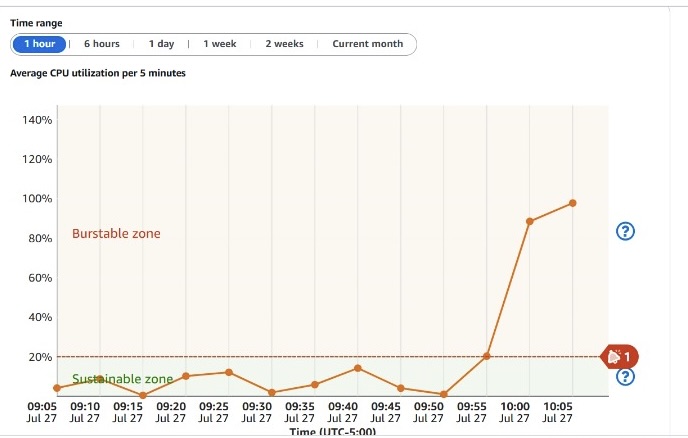
100% CPU threshold hit
Even with the server upgrade, uploads remained painfully slow.
Efficiency: 0.
The Overblown Guy
Then there is the other extreme — the “script everything” guy.
Now, I am not a GUI fan myself. GUIs are for users.Engineers should live in the CLI that is home. Django has something called a management command basically, a Python script for running custom operations like this upload. It is cleaner than clicking through the frontend but by default, it still runs sequentially.
That means:
October/pinned_1.xlsx must finish before October/pinned_2.xlsx starts.
So really, what is the difference between that and manually uploading files?
It is still slow, just automated this time.
The next logical step is asynchronous processing using Celery. With Celery, uploads run in the background, handled by distributed workers. You can process multiple files at once, based on how many workers and how much memory you allocate.
But here’s the catch:
If your dataset is this massive, memory becomes your biggest enemy.
When too many tasks run at once, your system can hit 100% CPU usage again, and failed uploads can go unnoticed.
task ID → multiple files → ✅ success
                |
                └── ❌ failed → (files not uploaded)
This method works beautifully but only if your logging and error handling are solid. Otherwise, you’ll miss silent failures.
the RIGHT way
Now, let us talk about what finally worked. I have not uploaded 2.5 million rows before this project, but I have done enough large imports to know how memory behaves.
I started with local testing, simulating uploads before touching staging. My local environment had 16GB RAM, and my first few runs were a mess, lots of spreadsheet parsing errors and skipped rows. So, I built a logging system that tracked failed rows and files. Then I fixed the corrupted spreadsheets and turned my focus to memory optimization, since the staging server only had 4GB RAM now.
Using Celery was a lifesaver.
I added flags and logic to:
- Control how many files each queue handled.
- Add short delays between batch uploads.
That balance kept memory stable while maintaining concurrency.

100% CPU usage during early tests

Optimized run at 34% CPU usage
After multiple test cycles (and dropping/recreating tables more than 10 times), I finally nailed it:
- All 200 files uploaded successfully
- Total upload time: ~30 minutes
- Failure rate: <2%
It took a lot of iteration, and debugging which is what engineering really is.