the engineer they told you to ignore
this is the engineer people hate to see coming because all we do is complain about how a certain language or framework is slow and theorize about how it could be better. But I feel good writing about this, knowing you can learn a lot from it. Personally, I believe this is type of engineer you should be. Always remember, that it can be faster.
"if you dont honor the millisecond you will end up with seconds even minutes."
- Thorsten Ball
Working on legacy codebase can feel like a fullstop, you inherit everything for sure including your new thought and approach to work. You have to learn the existing patterns and implements features the way the codebase dicatates. I am on this path too, but the only difference is that when i write code, I honor the millisecond.
Okay let get to work, the codebase is complex deeply nested with layers upon layers. Understanding where to nest is crucial. For instance, making changes to a single API response requires me to open 5 to 6 splits in my Neovim setup. Thank God for Harpoon, which lets me assign marks to certain files and reduces the number of splits I need open at once.
The API response became slow, which meant I had to find the root cause. The app was taking too long to load, and simple operations like fetching random data from the database or inserting a few kilobytes were dragging.
The problem seemed overwhelming at first, but I broke it down systematically. My first approach was profiling each request, and it quickly became clear, we had an N+1 query problem. I set up my local environment and used Django Silk to test each critical endpoint one by one. (Oh, I forgot to mention—this is a Django project that was converted to Django Ninja, with a lot of weird quirks still lingering.)
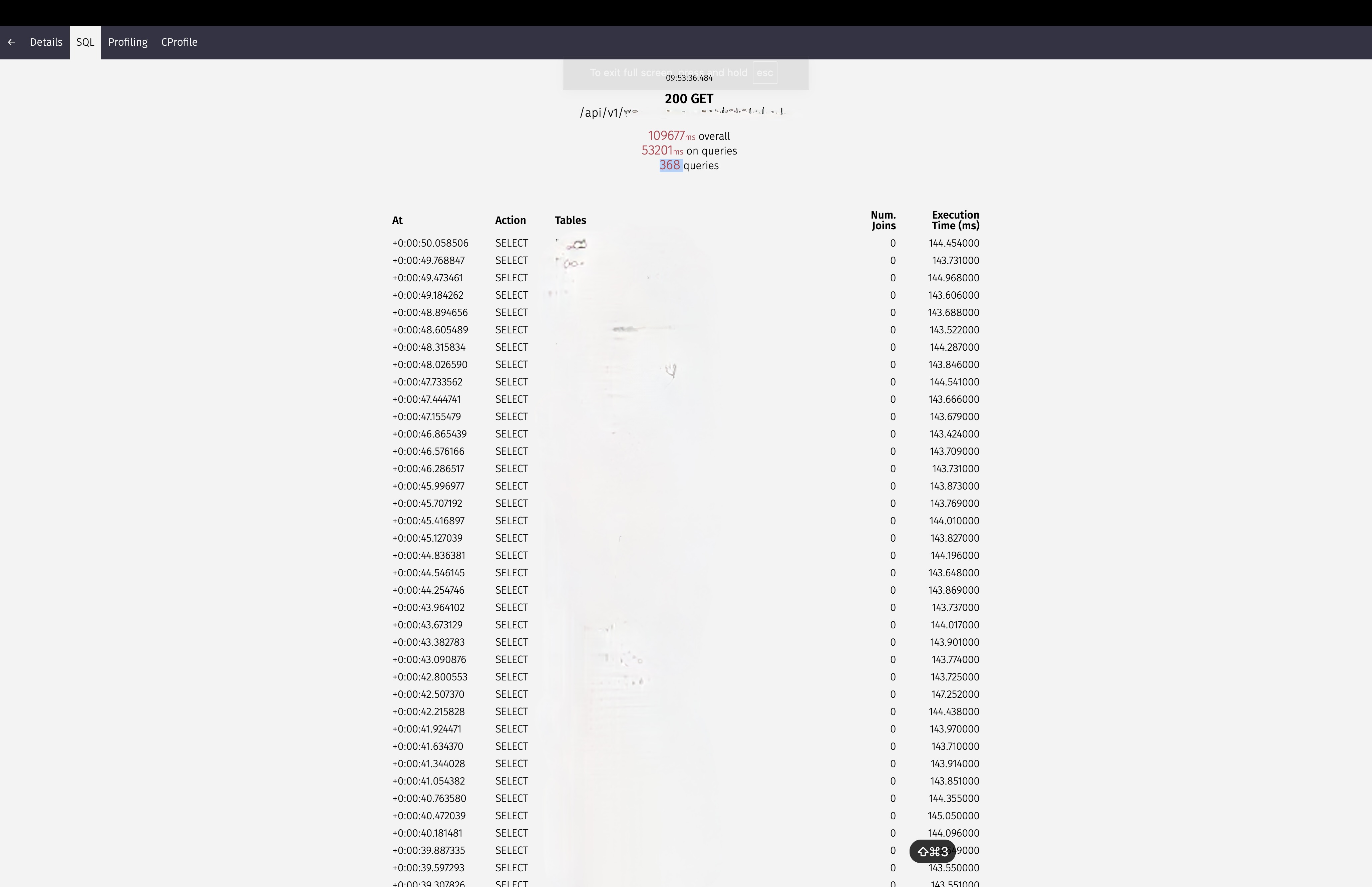
109677ms Overall, spending 53201ms on queries, running 368 queries
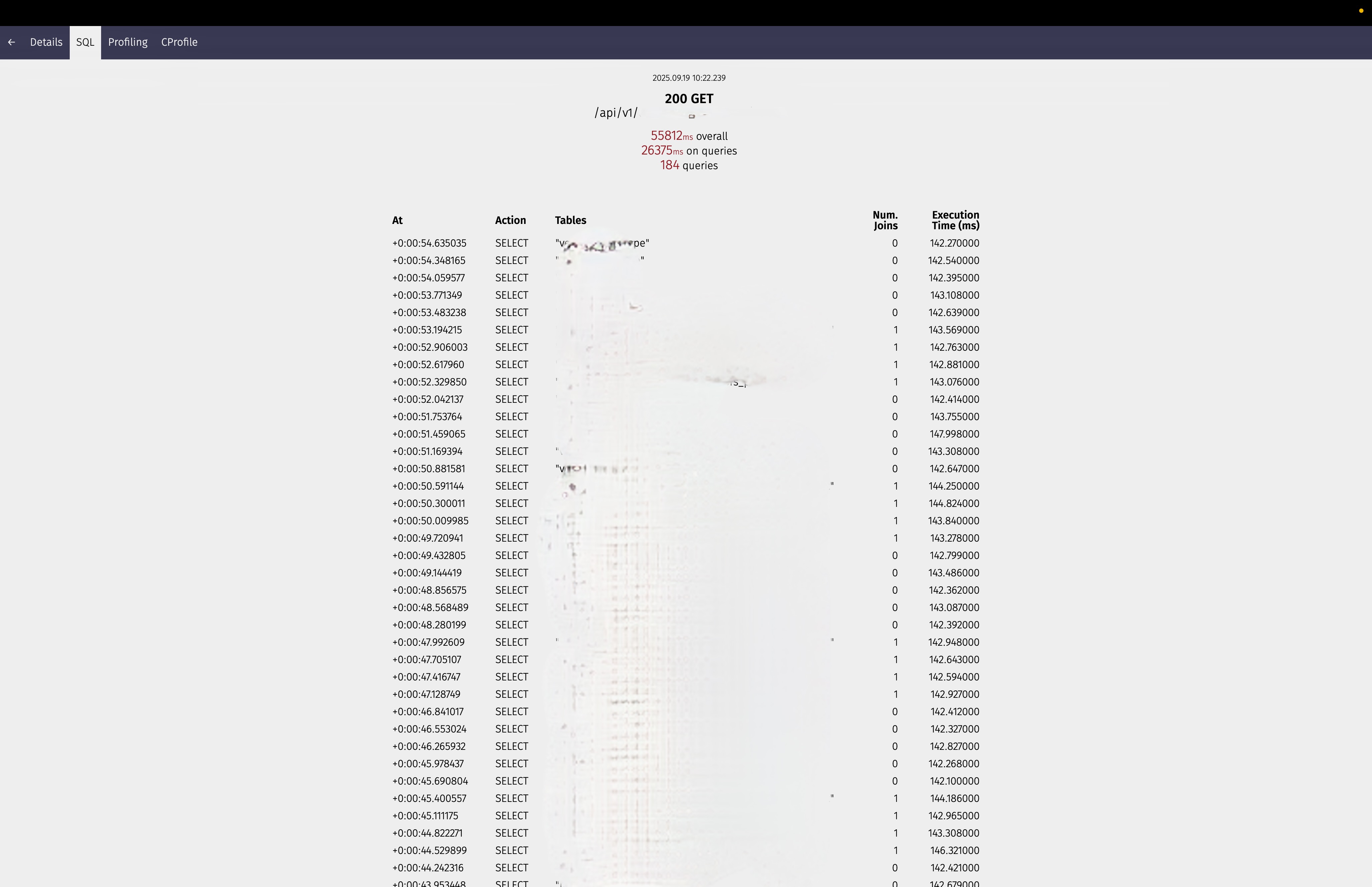
55812ms Overall, spending 26375ms on queries, running 184 queries
I dont like it HERE
You can see the sorcery there, I have endpoints running for minutes, that could drive a user psycho. There is one endpoint alone running 190 queries. You can see how bad that is. But that’s not the only problem: some responses include data that is not even being used or displayed. Now that I know the root of my problem, I have to solve it. This means rewriting code and examining a lot of joins and relations. The bar is pretty high when you’re refurbishing code instead of implementing new features. You have to tighten your belt and get to work.
Everywhere you go, it is a common refrain, Python is slow. And here I am using a framework I did not even implement myself. Bruh, let’s stop complaining and just get to work, but I still hate it here. I don’t play with my milliseconds, and I will always fight for them until I get them. That is why I use Vim too.
    Stop Complaining, Start Fixing. OKAY
    Every morning when I wake up and get ready for the office
    I tell myself
    I have to lock in
    I know there is a long month ahead of me making these APIs better
Thank God I use Vim, which keeps me focused on my keyboard and away from the distraction of the mouse or other temptations. When I am locked in, I am locked in for sure.
N + 1 queries
This is one of the most common problems engineers face when handling database queries, and ORMs can’t save you from it. The N+1 problem occurs when you are hitting the database repeatedly every time you need related data once for the main query, then N additional times for each related object. Normally, you shouldn’t be hitting the database every single time a piece of data is needed. That is why we have prefetch_related and select_related. These methods help reduce the number of database hits by fetching related data efficiently in bulk, rather than making separate queries for each object.
case I: the bad way
def get_menu_list_bad(request):
    menu_list = Menu.objects.all() # 1 query
    for menu in menu_list:
        print(f"{menu.name} by {menu.vendor.name}") # N queries (one for each menu)
    return JsonResponse(menu_list, safe=False)
Looking at case I, the problem is clear in the first instance we hit the database to gell all the menu list. Then, because we need the vendor who created each menu, we hit the database again for each vendor’s name. So if we want to get 100 menus, we end up hitting the database 101 times—once for the menu list and 100 times for each vendor. That is bad. Extremely, outrageously bad.
YOU SHOULD NOT LIVE YOUR LIFE LIKE THAT!
case II: the good way (ForeignKey)
def get_menu_list_good(request):
    menu_list Menu.objects.select_related('vendor').all()

    for menu in menu_list:
        print(f"{menu.name} by {menu.vendor.name}")
    return JsonResponse(menu_list, safe=False)
In Case II, we are using select_related, which tells the database to fetch the vendor data along with the menu list in a single query using a SQL JOIN. So we only hit the database once. This works when vendor is a ForeignKey attached to Menu, like this.
case III: Model Structure (ForeignKey)
class Vendor(models.Model):
    name = models.CharField(max_length=100)

class Menu(models.Model):
    name = models.CharField(max_length=100)
    vendor = models.ForeignKey(Vendor, on_delete=models.CASCADE)
For instances where there is a m2m relationship, we cant use select_related, Instead, we have to use prefetch_related, as shown in Case IV
case iV: ManyToMany Relationships
class MenuCategory(models.Model):
    name = models.CharField(max_length=50)

class Menu(models.Model):
    name = models.CharField(max_length=200)
    categories = models.ManyToManyField(MenuCategory)

def menu_bad(request):
    menu = Menu.objects.all()  # 1 query

    for each in menu:
        pasta = ", ".join([c.name for c in menu.categories.all()])  # N queries!
        print(f"{menu.name}: {pasta}")

    return JsonResponse(list(menus.values()), safe=False)


def menu_good(request):
    menu = Menu.objects.prefetch_related('categories').all()

    for each in menu:
         pasta = ", ".join([c.name for c in menu.categories.all()])  # No extra queries!
        print(f"{menu.name}: {pasta}")

    return JsonResponse(list(menus.values()), safe=False)
As explained in Case IV, we are using prefetch_related, which tells the database to fetch the categories data along with the menu list. With this approach, we only hit the database twice, once for menus and once for all related categories.
The prefetch_related you are already using -> edge cases
Now there is another scenario where you are already using the prefetch_related, but still getting the N+1 queries problem, let look at case v
case v: Complex Model Structure
class Vendor(models.Model):
    name = models.CharField(max_length=100)

    def __str__(self):
        return self.name

class Menu(models.Model):
    name = models.CharField(max_length=200)
    vendor = models.ForeignKey(Vendor, on_delete=models.CASCADE, related_name='menus')
    created_at = models.DateTimeField(auto_now_add=True)

    def __str__(self):
        return self.name

class Review(models.Model):
    menu = models.ForeignKey(Menu, on_delete=models.CASCADE, related_name='reviews')
    rating = models.IntegerField(default=0)
    comment = models.TextField(blank=True, null=True)
    created_at = models.DateTimeField(auto_now_add=True)

    def __str__(self):
        return f"Review of {self.menu.name}"
case v shows us a Menu model with a vendor ForeignKey each vendor can create multiple menus. We also have a Review model with a menu ForeignKey—multiple reviews can be attached to each menu. Now, let’s say we want to get all reviews for each menu along with the vendor name in our GET response. We need to join data from different tables, right?
case vI: The Wrong Way to Filter Prefetched Data
def get_menu_review_bad(request):
    vendors = Vendor.objects.prefetch_related("menus__reviews").all()
    today = datetime.date.today()
    start_of_day = datetime.datetime.combine(today, datetime.time.min)


    for vendor in vendors:
        print(f"\n{vendor.name}")
        for menu in vendor.menus.all():
            today_reviews = menu.reviews.filter(created_at__gte=start_of_day) #the filter is here, it ignores the prefetched fields
            print(f"{menu.name} have {len(today_reviews)} reviews today")
case vI shows the bad way to use prefetch_related. We are using it to load all reviews for all menus, but filtering after the prefetch causes NEW database queries, the N+1 problem returns! So if you have 10 vendors with 5 menus each, that is 50 additional queries for filtering, which makes the prefetch_related completely wasted because .filter() bypasses the cache.
case vII
def get_menu_review_good(request):
    today = datetime.date.today()
    start_of_day = datetime.datetime.combine(today, datetime.time.min)

    vendors = Vendor.objects.prefetch_related(
            "menus",
            Prefetch(
                "menus__reviews",
                queryset=Review.objects.filter(created_at__gte=start_of_day),
            ),
        ).all()

    for vendor in vendors:
        print(f"\n{vendor.name}")
        for menu in vendor.menus.all():
            reviews = menu.reviews.all()
            print(f"{menu.name} have {len(reviews)} reviews today")
case vII shows the right way to use prefetch_related. We only use 3 queries here regardless of how many vendors we have, the first query fetches all vendors, the second fetches all menus for those vendors, and the third fetches all filtered reviews for those menus. Then we are done, no matter how many vendors or menus we have.
API response - the case of returning unnecessary or unused response
Going further, the N+1 queries problem is not the only issue. I also notices some POST requests taking longer than usual. Drilling down to the cause, I found unnecessary data being returned in the response. To get that response, we had to join multiple tables, which brought us back to the N+1 queries problem. I didn’t need to optimize the N+1 in this instance. I just sat down with the frontend engineer, and he was able to tell me what response data he needed and what he didn’t need at that moment.
Reducing the response size is like a cheat code. If the client doesn’t need the vendor’s address at that instance, don’t return it. Keep it for when the client actually needs it, and just return the status code with the minimal response required.
the thing you are already doing: server location -> edge cases
the final thing I want to advise, which I know you might already be doing, is to use a server near your users when deploying your application. If you’re using a server that is far away from your users, you’re going to have high latency. So the final optimization we did was move the API to servers near our region, which finally helped reduce latency as well.
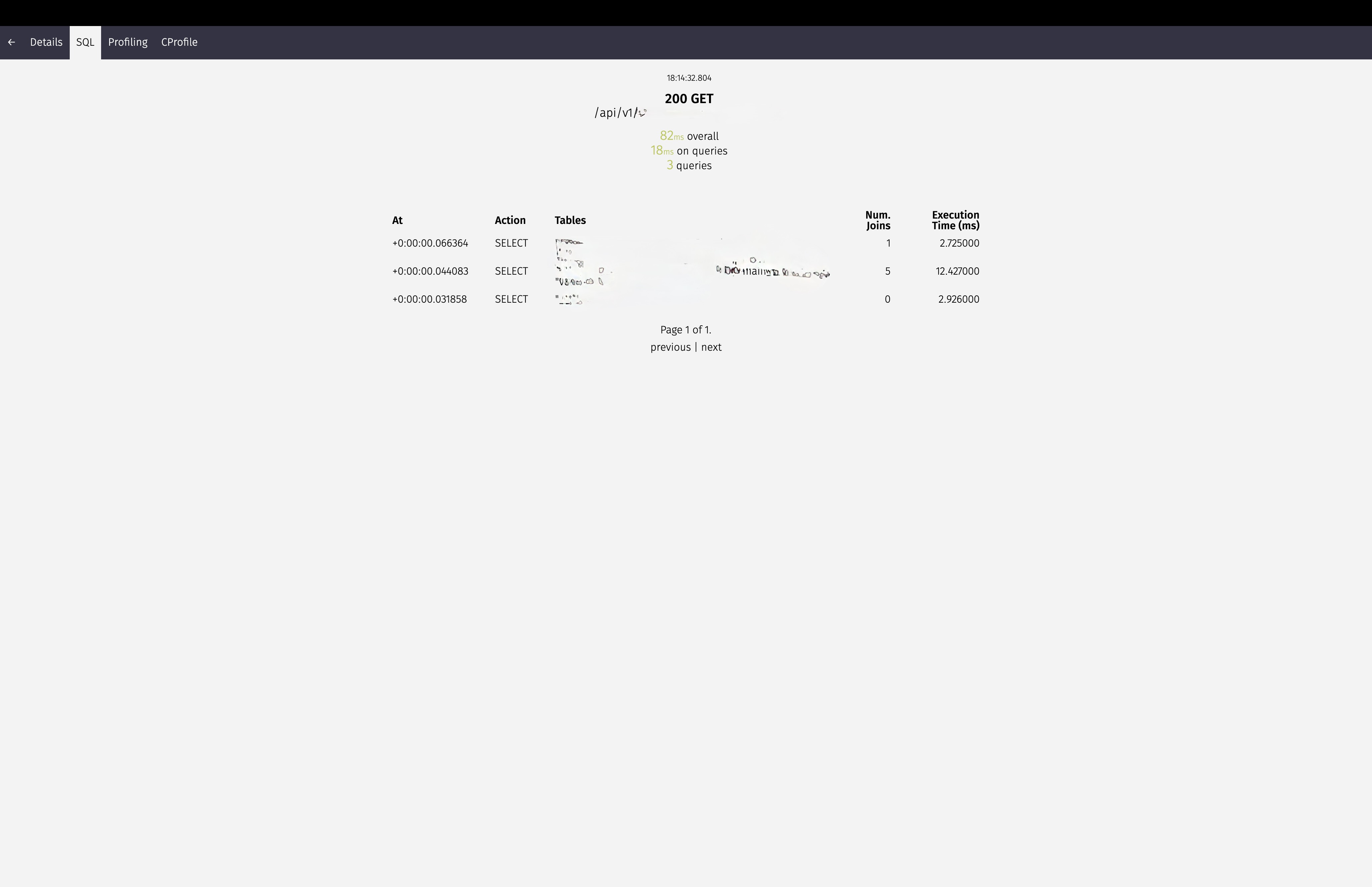
Optimized to 80ms Overall, spending 18ms on queries, running 3 queries now
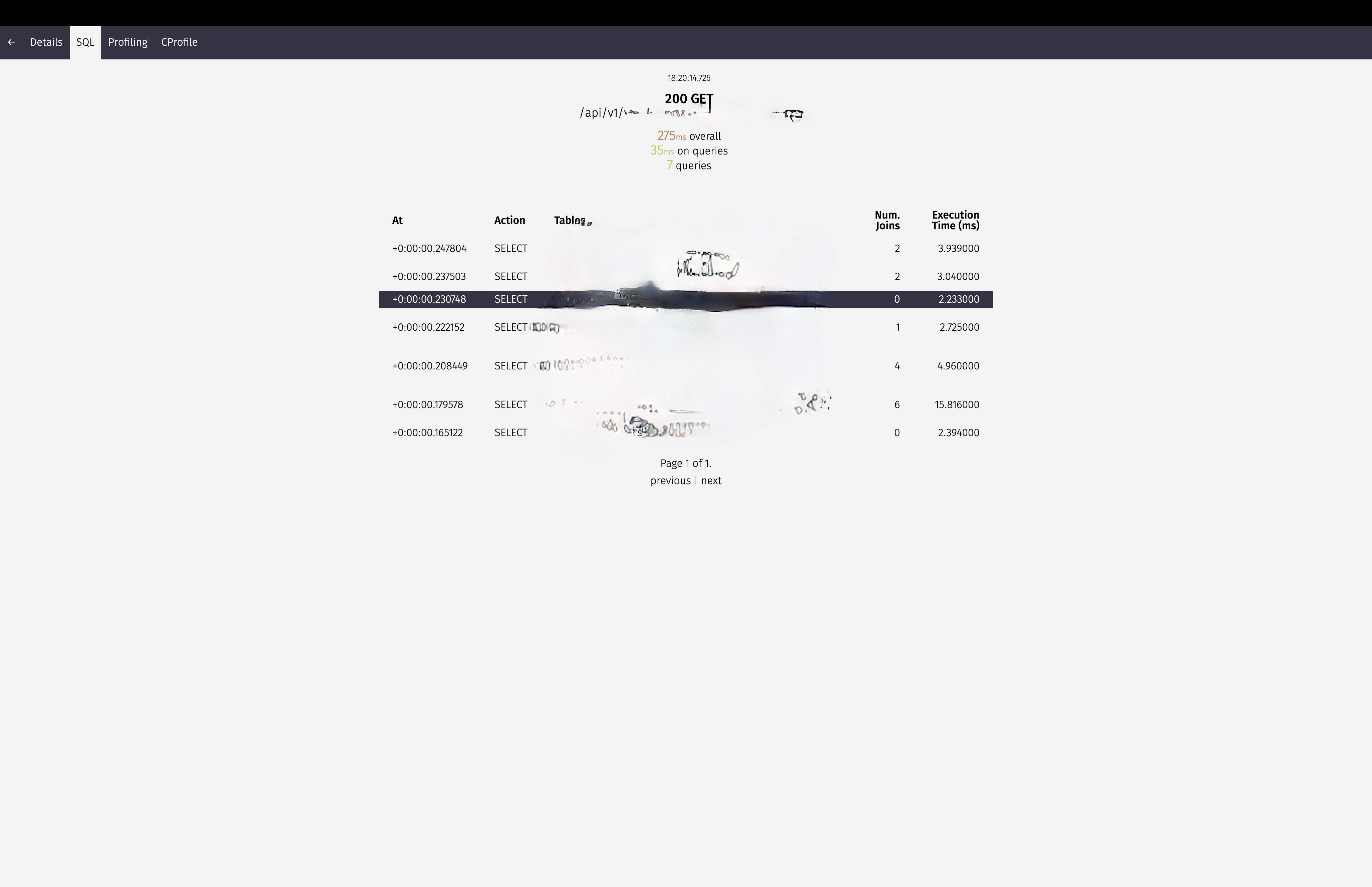
Optimized to 275ms Overall, spending 35ms on queries, running 7 queries now
From 100,000ms to ~80ms
finally, I was initially tasked with taking an API response from 100,000ms down to 80ms. But at least we have results, and engineering takes time before you get the required outcome you’re looking for. Now we have 80ms as the response time, that is the GOAL for now. Maybe we will have more optimization tasks next time.
"i don't feel i done enough, so i'ma keep on doin' this sheet"
-lil wayne